Tired of lag ruining your Warzone drops or disconnecting from your raid team in Destiny 2? In 2026, with games becoming more immersive and requiring constant online interaction, understanding what internet speed you truly need for gaming is more critical than ever. This comprehensive guide cuts through the technical jargon, offering practical advice for the busy gamer who balances work, family, and a passion for virtual worlds. We'll explore the difference between download and upload speeds, the critical role of latency, and how your home network setup impacts performance. Discover how to optimize your connection to ensure smooth gameplay, whether you're dominating in esports titles or enjoying a relaxing session with friends in a cozy co-op. Learn to make smart choices without overspending, ensuring your gaming experience is seamless and stress-free. We address common pain points like unexpected lag spikes, the best way to game on a budget, and how to future-proof your setup for upcoming titles and trends. This article is your ultimate resource to level up your internet connection for a superior gaming experience.
Q: What is the optimal internet speed for competitive esports gaming?
A: For competitive esports, consistent download speeds of 100-200 Mbps and upload speeds of 10-20 Mbps are highly recommended. However, critically, focus on achieving a stable connection with extremely low latency (under 30 ms) via a wired Ethernet connection. This stability and low ping will impact your performance more than raw speed beyond these thresholds.
Q: How does internet speed affect game downloads and updates?
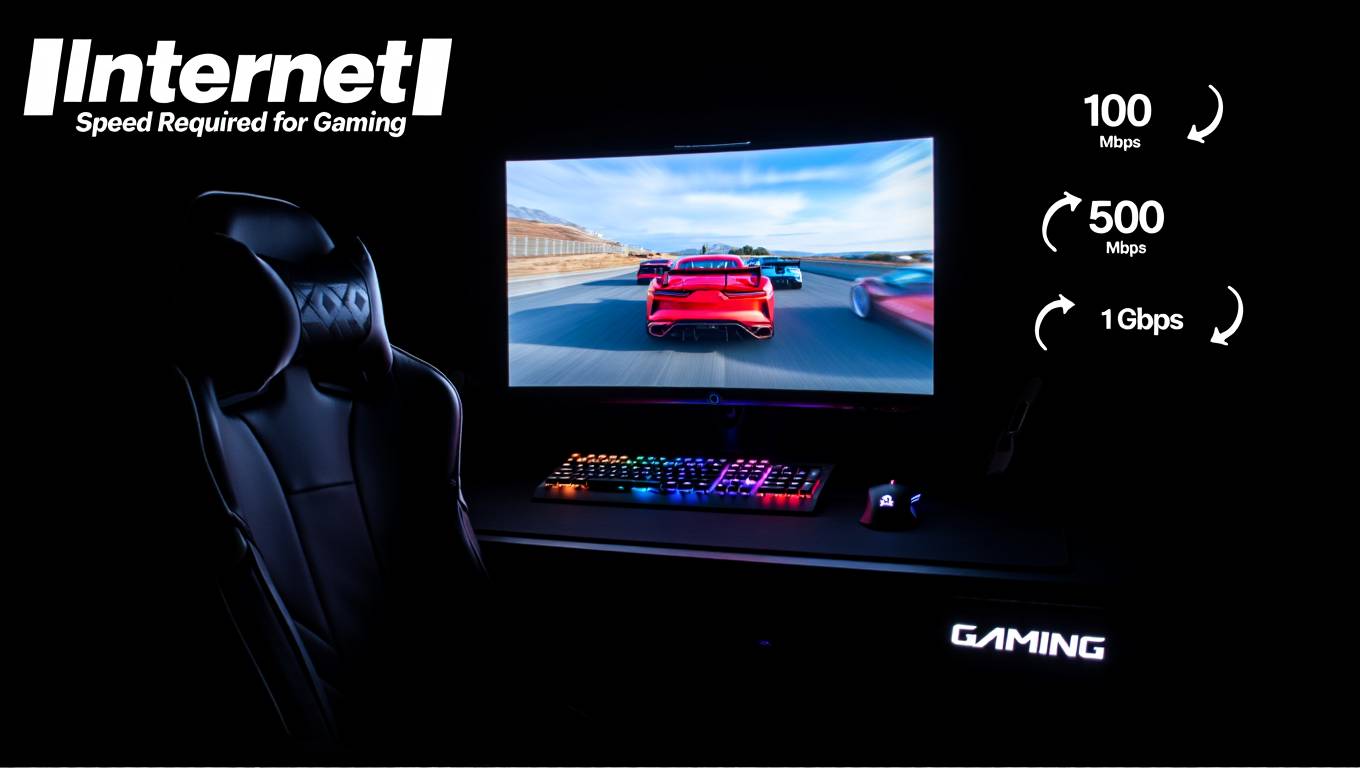
A: Higher download speeds significantly reduce the time it takes to download new games and large updates. For example, a 100 GB game might take around 2.5 hours on a 100 Mbps connection, but only 20 minutes on a 500 Mbps connection. Faster speeds get you into the action quicker without waiting for patches.
Q: What role does my internet service provider (ISP) play in my gaming experience?
A: Your ISP is fundamental. A reliable ISP provides consistent speeds, lower latency to game servers, and better network infrastructure. Some ISPs may also offer gaming-specific features or support that can further optimize your connection. Researching ISP reputation for gamers in your area is crucial.
Q: Can a VPN improve my internet speed or latency for gaming?
A: Generally, a VPN will not improve your internet speed or latency for gaming. It usually adds a slight overhead due to encryption and routing traffic through an additional server, which can increase ping. In rare cases, if your ISP is throttling gaming traffic or routing it inefficiently, a VPN might offer a more direct path, but this is uncommon.
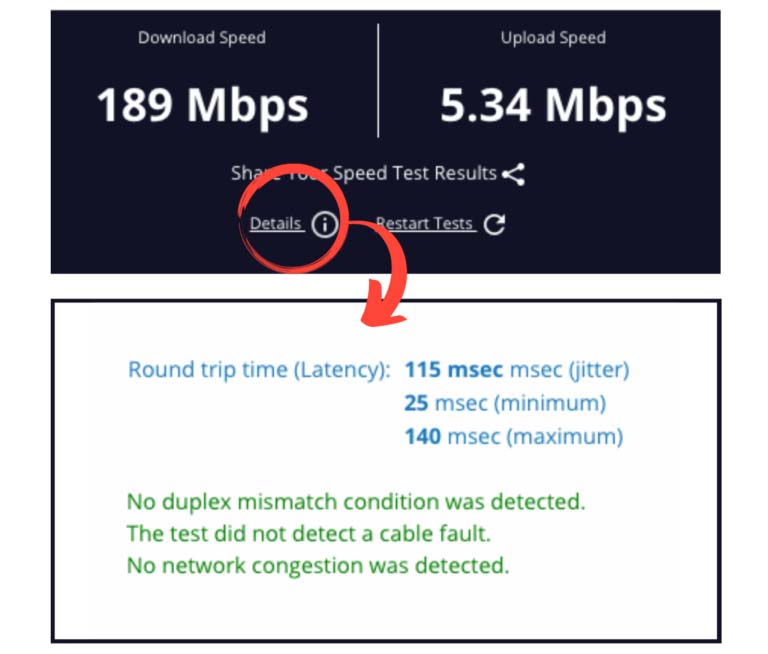
Q: How can I check my current internet speed and ping for gaming?
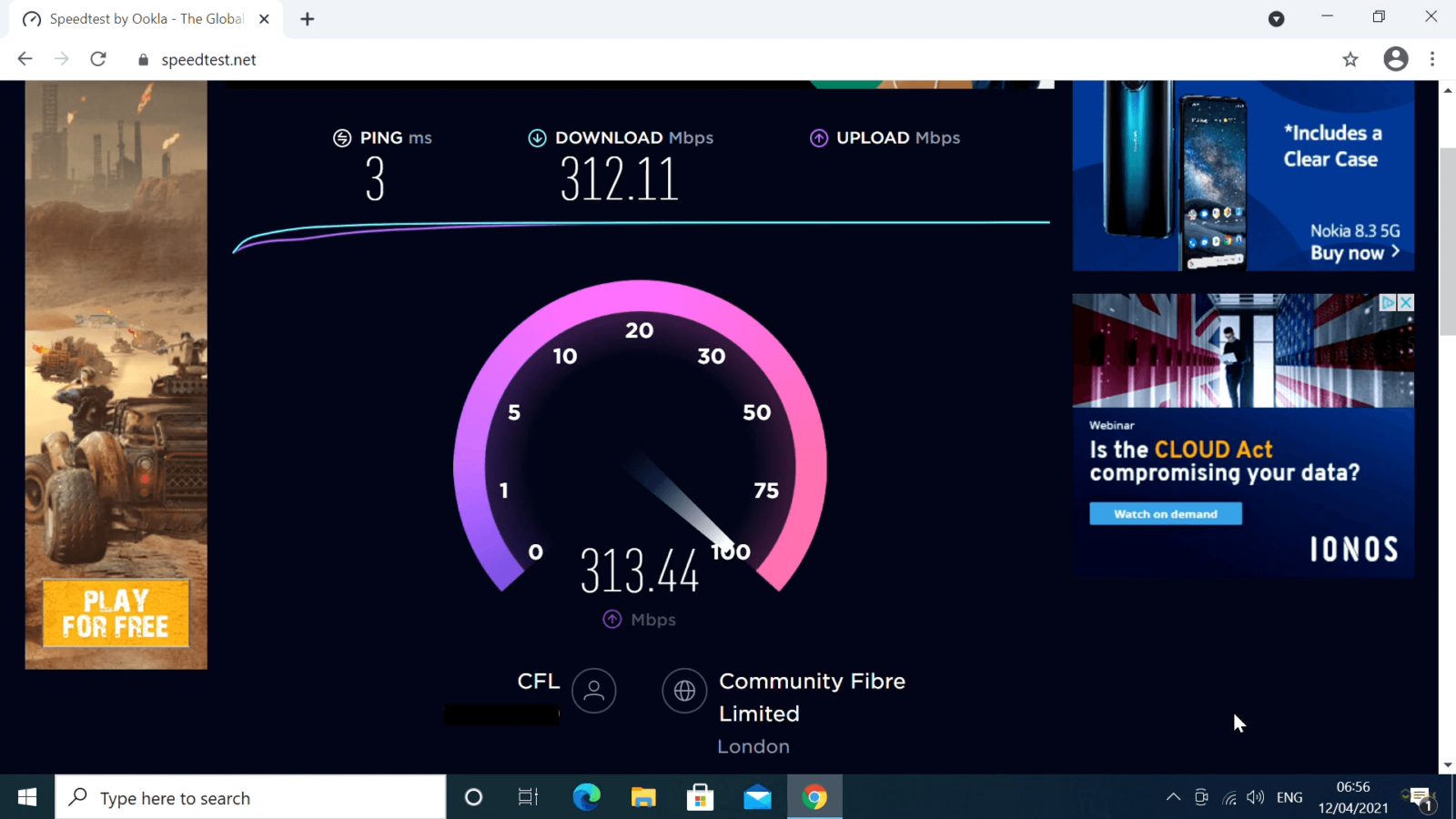
A: You can easily check your internet speed and ping by using online speed test websites like Speedtest.net or Fast.com. Make sure to run the test on the device you game on, preferably while connected via Ethernet, and choose a server geographically close to game servers you typically play on for the most accurate latency reading.
Q: Is it worth upgrading my internet plan if I only play single-player games?
A: If you primarily play single-player games offline, your internet speed needs are minimal, mainly for initial game downloads, updates, and occasional online features. Upgrading beyond a basic broadband plan (e.g., 50-100 Mbps) solely for single-player gaming is usually not necessary unless you frequently download massive files or stream high-resolution content to other devices.
Q: How do other devices in my home impact my gaming internet speed?
A: Every device connected to your network, especially those streaming video, downloading files, or on video calls, consumes bandwidth. If your total internet speed is low, these activities can significantly reduce the available bandwidth for your gaming device, leading to lag and performance issues. Using a modern router with Quality of Service (QoS) settings can help prioritize gaming traffic.
Are you a gamer who loves diving into virtual worlds after a long day, but often finds your immersion broken by frustrating lag? You are not alone. For the average US gamer, around 36 years old, who balances a job, family, and life commitments, gaming is a vital outlet for relaxation, fun, and connecting with friends. With 87 percent of US gamers regularly spending 10+ hours a week in games, a smooth online experience is non-negotiable. But what speed internet do I need for gaming in 2026, when games are bigger, more detailed, and demand more from our connections? This guide is for you, the dedicated gamer looking to optimize your setup without unnecessary hype or overspending. We will cut through the confusion to help you understand exactly what your internet needs are to ensure seamless performance, whether you are building skills in an esports title or unwinding in a cozy social game.
Forget the days when any broadband would do. Today's gaming environment, with its emphasis on cross-play between PC, console, and mobile, massive open worlds, and social interactions on platforms like Discord, requires a more thoughtful approach to your internet connection. We will address common pain points like frustrating lag, unexpected disconnections, and how to get the most bang for your buck when upgrading your internet or hardware. Let us dive in and equip you with the knowledge to conquer your digital adventures without network woes.
How Much Download Speed Do I Really Need for Gaming?
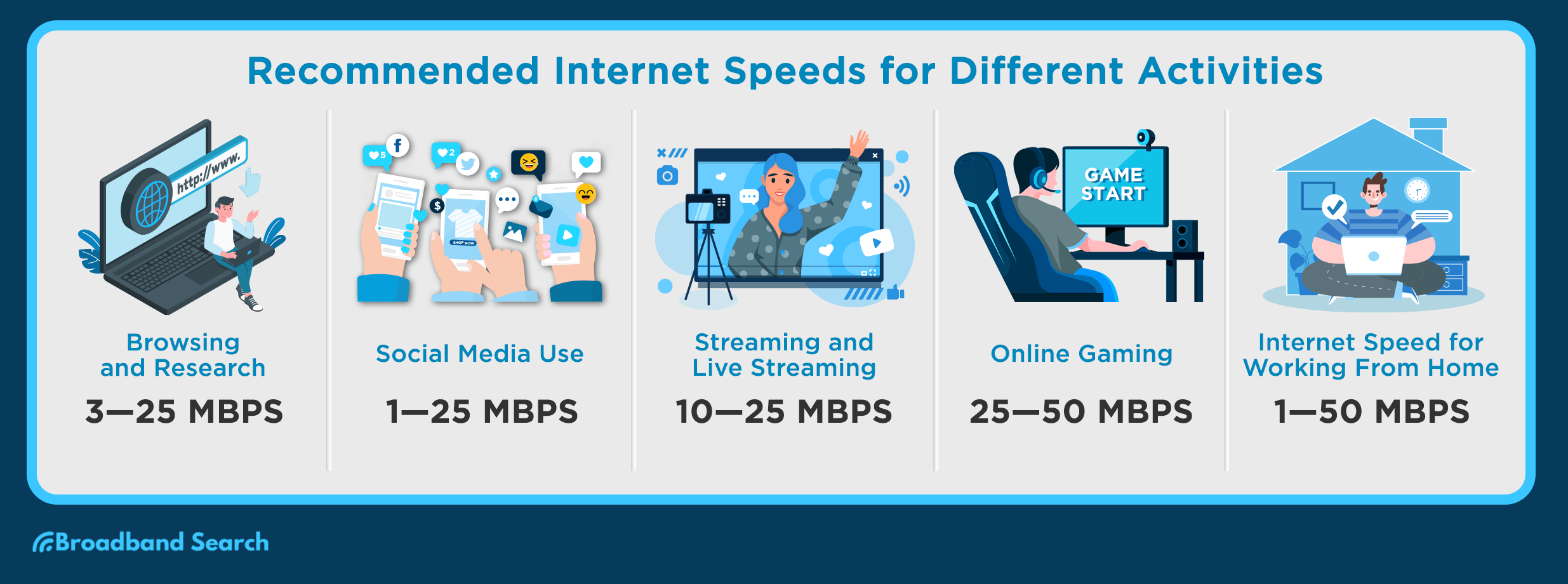
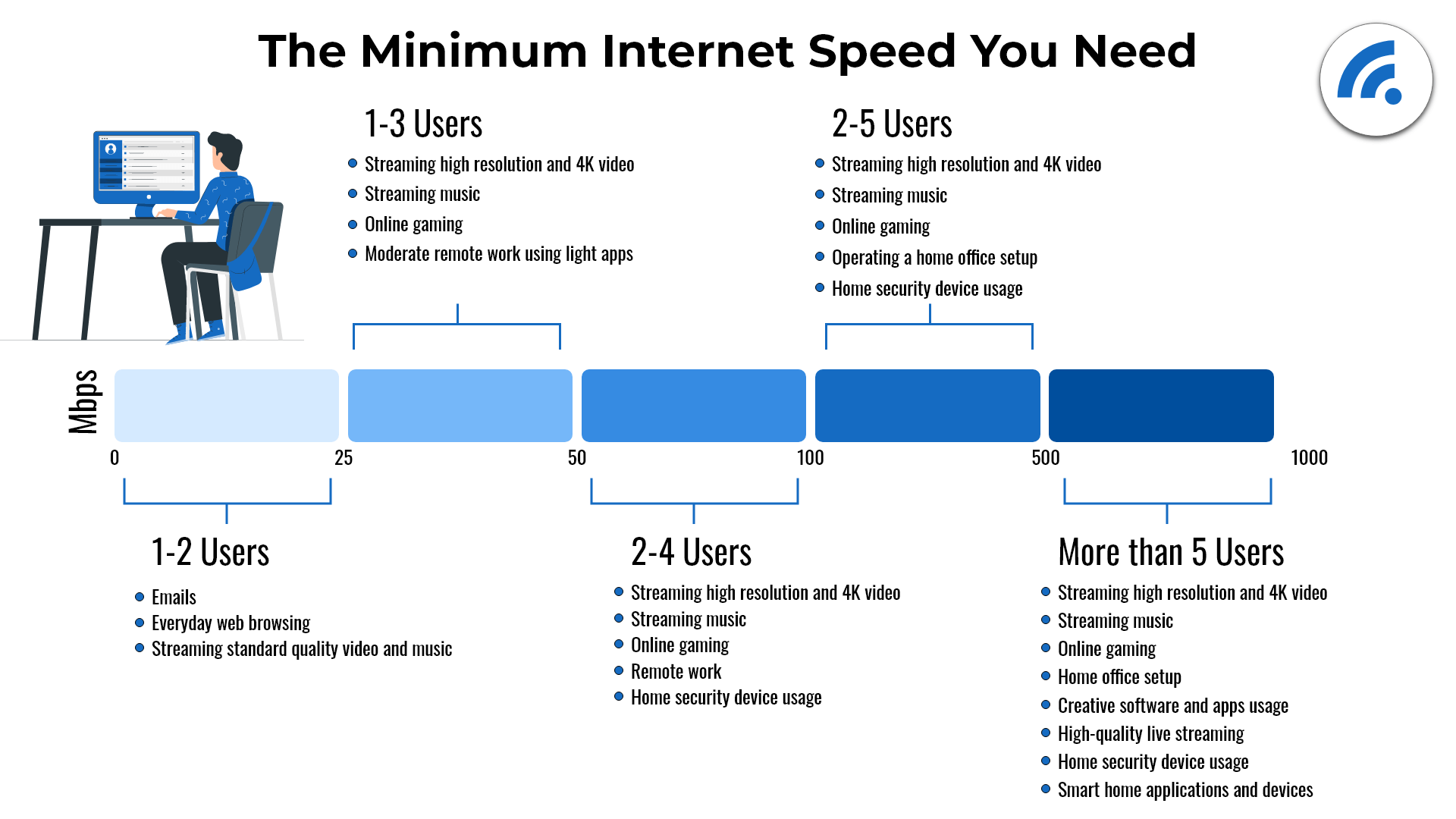
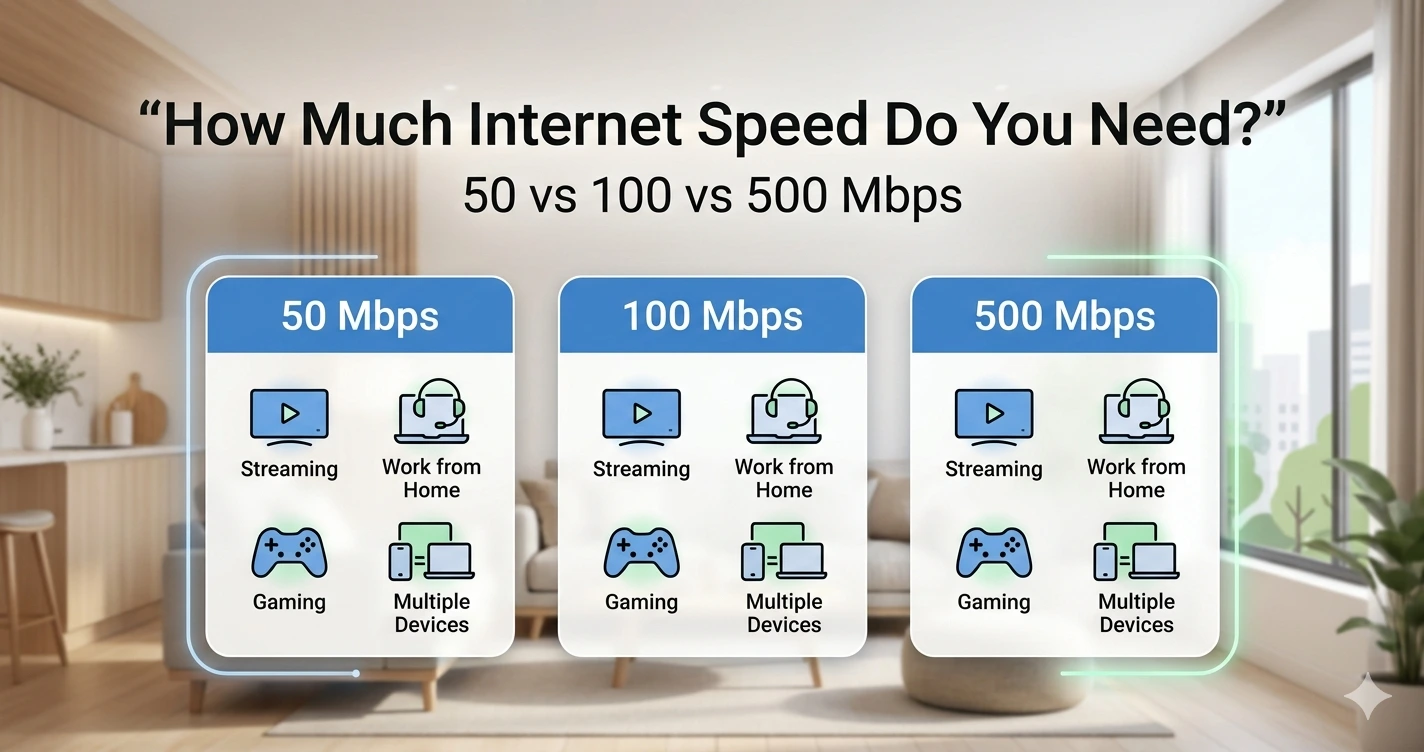
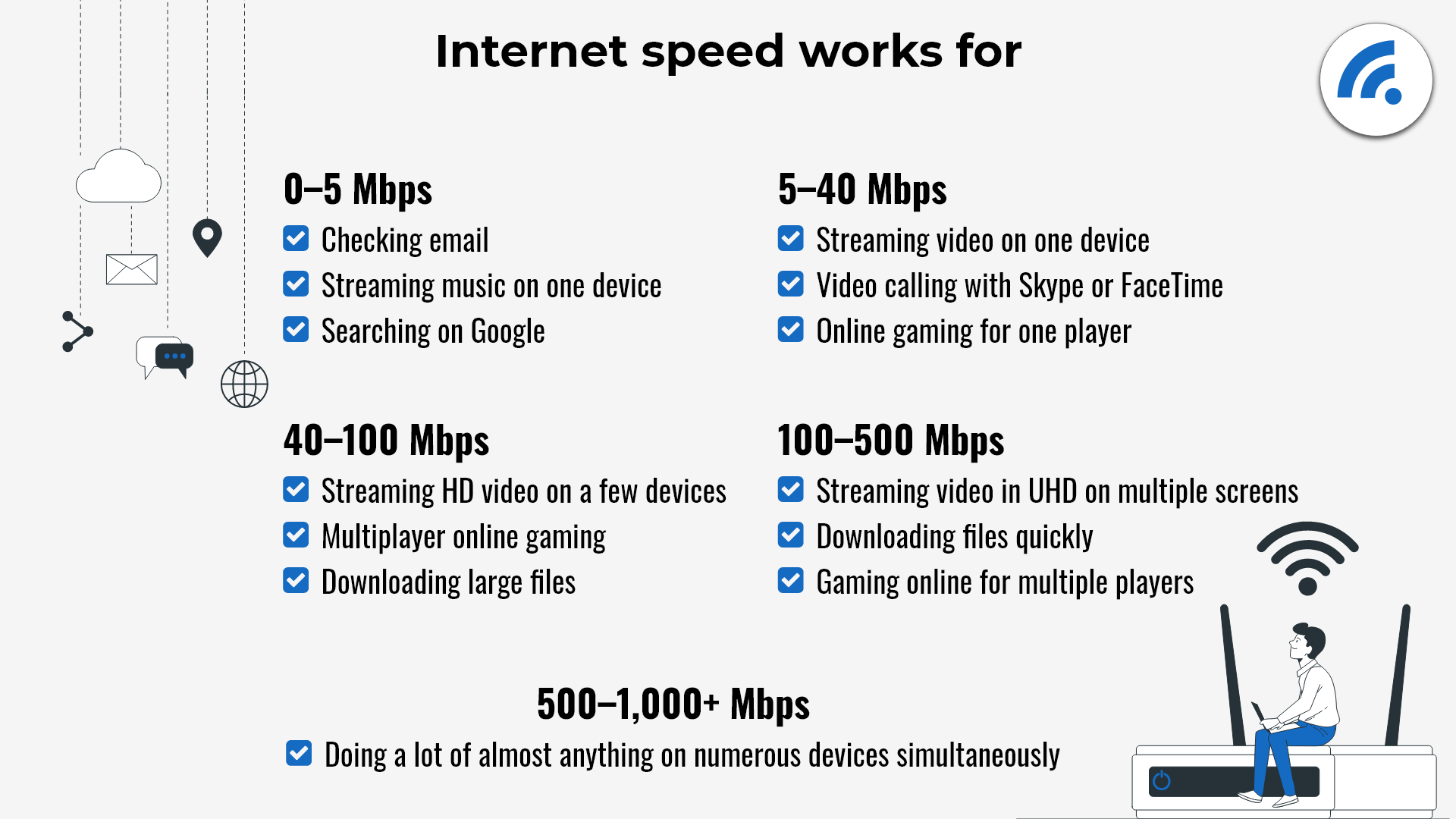
When most people talk about internet speed, they are usually referring to download speed, measured in Megabits per second (Mbps). For gaming, this is crucial for quickly downloading game updates, new titles, and streaming game data. While some older guides might suggest 25-50 Mbps is sufficient, the landscape has evolved significantly by 2026. For a single gamer who primarily plays online multiplayer, a minimum of 50-100 Mbps download speed is a solid baseline.
However, if you are sharing your internet with others who are also streaming 4K content, video conferencing, or downloading large files, you will want more headroom. A household with multiple devices and gamers should aim for at least 200-500 Mbps. Remember, gaming itself does not consume a huge amount of continuous bandwidth during gameplay after the initial download, but spikes from background updates or other users can severely impact your experience if you do not have enough overall capacity.
What About Upload Speed and Latency? Why Are They Crucial?
While download speed gets a lot of attention, upload speed and latency are arguably even more critical for a smooth gaming experience, especially for competitive play. Upload speed dictates how quickly your console or PC sends data back to the game server. For most online games, an upload speed of 5-10 Mbps is generally sufficient for a single gamer. If you are streaming your gameplay on platforms like Twitch or YouTube, or frequently uploading large video clips, you will need significantly more, often 20-50 Mbps or higher, depending on your stream quality.
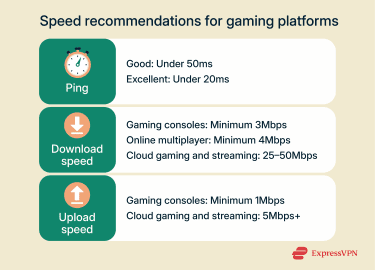
Latency, or ping, is the time it takes for a signal to travel from your device to the game server and back. It is measured in milliseconds (ms), and lower is always better. A ping below 20 ms is considered excellent, offering virtually no noticeable delay. Between 20-50 ms is good, while anything above 100 ms will likely result in noticeable lag, often referred to as 'rubberbanding' or hit registration issues. Your download and upload speeds can be fantastic, but high latency will still ruin your game. This is often more dependent on your physical distance to game servers and the quality of your internet service provider's network than your headline speed.
Wi-Fi vs. Wired Connection: Which is Better for Gamers?
This is a classic question, and for 2026, the answer remains largely the same: a wired Ethernet connection is almost always superior for gaming. While modern Wi-Fi 6 and Wi-Fi 6E (and upcoming Wi-Fi 7) offer impressive speeds and reduced latency in ideal conditions, they are still susceptible to interference, signal degradation over distance, and congestion from other wireless devices.
- Wired Ethernet: Provides the most stable, fastest, and lowest-latency connection. It eliminates wireless interference and ensures a dedicated pathway for your gaming data. If competitive performance is your goal, always connect your PC or console directly to your router with an Ethernet cable.
- Wi-Fi: Convenient for mobile gaming or consoles that are far from the router. For casual gaming, it can be perfectly adequate. However, be mindful of your router's location, avoid physical obstructions, and ensure your devices support the latest Wi-Fi standards for the best wireless experience. Mobile gaming, which dominates a significant portion of the US market, often relies on Wi-Fi or cellular data, making stable home Wi-Fi crucial for many.
Does the Type of Game I Play Affect My Internet Speed Needs?
Absolutely. Different genres and game types have varying demands on your internet connection:
- Competitive Online Multiplayer (e.g., Call of Duty Warzone, Valorant, Apex Legends, Rocket League): These games demand low latency and stable connections. Even a small amount of lag can mean the difference between winning and losing. Aim for excellent latency (under 30ms) and consistent speeds.
- MMORPGs (e.g., World of Warcraft, Final Fantasy XIV): While still online, these often have more forgiving latency requirements than fast-paced shooters. A stable connection is key, but minor lag spikes are less critical for moment-to-moment gameplay.
- Cloud Gaming (e.g., Xbox Cloud Gaming, GeForce NOW, PlayStation Plus Premium): This is where high, consistent download speed is paramount. Since the game is running on remote servers and streaming video to you, you need significant bandwidth. Recommendations typically start at 50 Mbps, with 100-200 Mbps being ideal for a smooth, high-resolution experience.
- Social & Cozy Games (e.g., Animal Crossing, Stardew Valley, Palworld): These games generally have very low internet requirements, focusing more on casual interactions than split-second reactions. Most standard broadband packages will suffice. Many free-to-play social games are trending this month, proving that you do not always need the absolute fastest connection to have fun.
How Can I Optimize My Home Network for Gaming?
Even with a great internet plan, a poorly configured home network can bottleneck your performance. Here are some tips:
- Use an Ethernet Cable: As mentioned, this is the gold standard for stability and low latency.
- Position Your Router: Place your router in a central location, away from obstructions and other electronics that might cause interference if you must use Wi-Fi.
- Upgrade Your Router: An old or low-quality router can be a major bottleneck. Invest in a modern router with Wi-Fi 6/6E (or 7, if available and budget allows) for better performance and capacity, especially for busy households.
- Quality of Service (QoS) Settings: Many modern routers allow you to prioritize traffic for specific devices or applications (like your gaming console or PC). Enabling QoS for gaming can ensure your game data gets preferential treatment.
- Minimize Background Downloads: Pause any large downloads, updates, or streaming on other devices in your household while gaming.
- Reboot Your Router/Modem: A simple reboot can often resolve minor connectivity issues and refresh your network connection.
When Should I Consider Fiber Optic Internet for Gaming?
Fiber optic internet offers symmetrical speeds (same download and upload speeds) and incredibly low latency, making it the holy grail for serious gamers and content creators. If fiber is available in your area and within your budget, it is almost always the best choice for gaming in 2026.
Fiber connections excel at handling multiple demanding tasks simultaneously without breaking a sweat. If you are into competitive esports, frequently stream your gameplay, or live in a household with heavy internet users, fiber will provide the most reliable and future-proof experience. With the rising influence of creators and streamers, and the continued trend towards high-fidelity online experiences, fiber offers the stability and speed needed to both play and share your gaming journey.
What are Common Gaming Internet Problems and How Can I Troubleshoot Them?
Even with an optimized setup, you might encounter issues. Here's a quick troubleshooting guide:
- Frequent Disconnects: Check your router's firmware for updates, ensure cables are secure, and test with an Ethernet connection. If issues persist, contact your ISP.
- High Ping / Lag Spikes: Close background applications, check for conflicting network activity, and ensure your router's QoS settings are prioritizing your game. Consider if you're connecting to a server that's geographically very far away.
- Slow Downloads / Updates: This is often a download speed issue. Try connecting via Ethernet, restart your router, and check if your ISP is experiencing an outage.
Remember, sometimes the issue isn't your internet speed but other factors like outdated hardware or game server issues. Always check game specific forums or server status pages.
Is it Possible to Game on a Budget-Friendly Internet Plan?
Absolutely. You do not always need the most expensive gigabit plan to enjoy gaming. For casual gamers, or those playing less demanding titles, a plan offering 50-100 Mbps download and 5-10 Mbps upload can be very effective, especially if you live alone or have minimal concurrent internet use. Focus on plans that offer consistent speeds and low latency, rather than just the highest number in the download speed advertisement. Many budget-friendly internet plans can provide a perfectly enjoyable experience for free-to-play titles and social games, which continue to trend in popularity this month.
What's your biggest gaming challenge? Comment below!
FAQ Section
Q: What is the absolute minimum internet speed for online gaming?
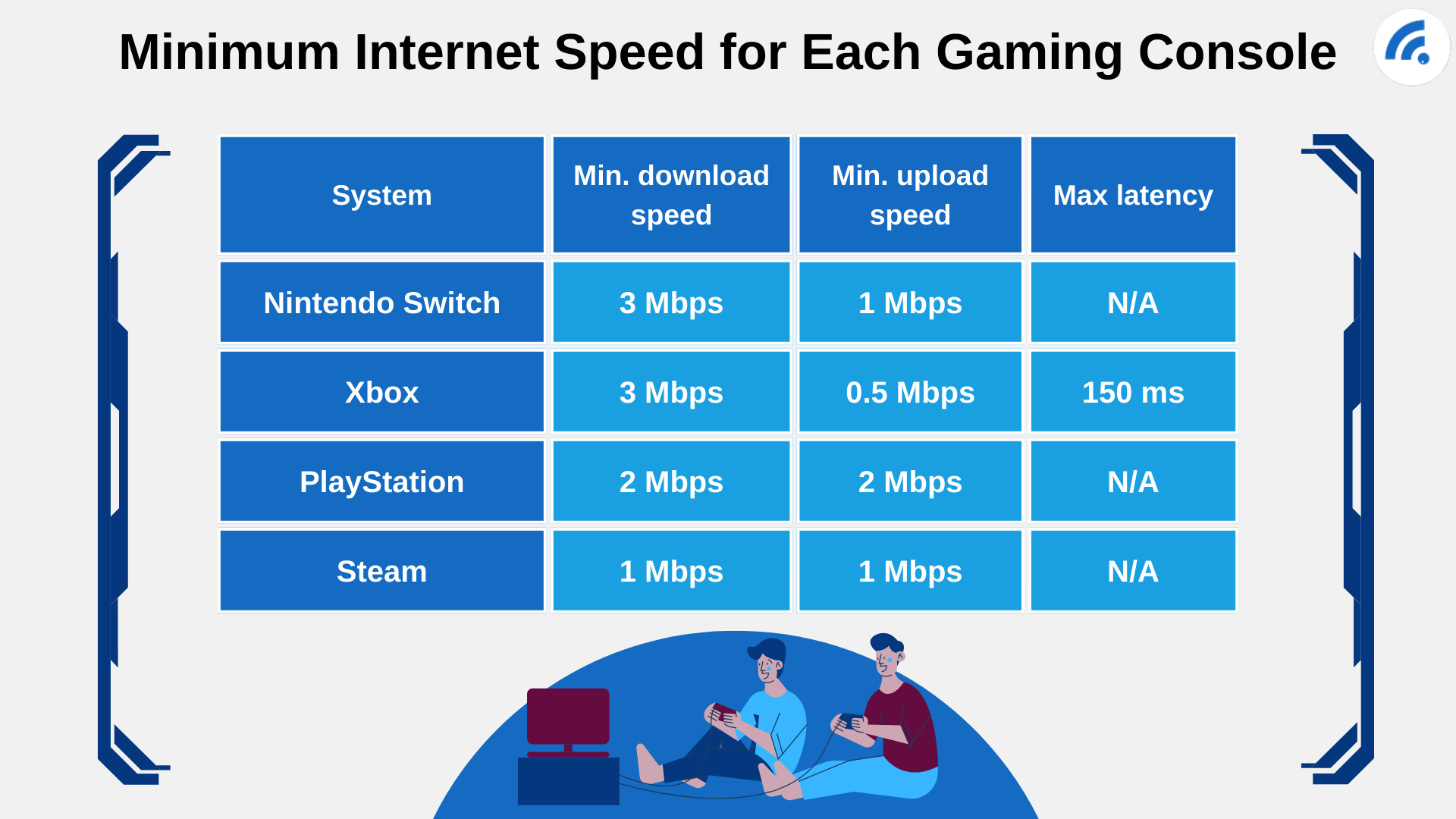
A: For a single user playing basic online multiplayer, 25-50 Mbps download and 3-5 Mbps upload are usually the bare minimum, but 50-100 Mbps download and 5-10 Mbps upload are recommended for a smoother experience in 2026.
Q: Does higher internet speed reduce lag?
A: Higher download and upload speeds provide more bandwidth, which can help prevent lag caused by insufficient capacity. However, latency (ping) is the primary factor for lag, and while speed can influence it, it's not the only factor. Low latency is key.
Q: Can I game effectively on Wi-Fi?
A: Yes, for most casual gaming. Modern Wi-Fi 6/6E is fast. However, for competitive gaming, a wired Ethernet connection is always preferred due to its superior stability and consistently lower latency, minimizing interference.
Q: How does my router affect gaming performance?
A: Your router is the central hub of your home network. An old or cheap router can bottleneck even a fast internet plan by providing poor Wi-Fi coverage, unstable connections, or inefficient data handling, leading to higher ping and slower speeds for gaming devices.
Q: What is ping and why is it important for gaming?
A: Ping, or latency, is the time (in milliseconds) it takes for data to travel from your device to the game server and back. A lower ping means less delay between your actions and what happens in the game, which is crucial for responsive and fair gameplay, especially in fast-paced genres.
Q: Should I pay for a gigabit internet plan just for gaming?
A: For most individual gamers, a gigabit plan (1000 Mbps) is overkill unless you are also a streamer, content creator, or live in a household with many heavy internet users. Often, 200-500 Mbps with good upload and low latency is sufficient and more cost-effective for dedicated gamers.
Conclusion
Navigating the world of internet speeds for gaming in 2026 can feel complex, but with the right knowledge, you can ensure your virtual adventures are always smooth and enjoyable. Remember, it is not just about the biggest download number; stable upload speeds and critically low latency are your best friends for a flawless gaming experience. By understanding your specific gaming habits, optimizing your home network, and making informed choices about your internet plan, you can minimize frustration and maximize your fun without breaking the bank. Whether you are chasing competitive glory, unwinding with friends, or exploring new worlds, a great connection is your foundation for success and relaxation. What is your biggest gaming challenge? Comment below!
Optimal gaming internet speeds for 2026, Understanding latency and ping for competitive play, The critical difference between Wi-Fi and wired connections for gamers, How to troubleshoot common lag issues in online games, Future-proofing your home network for advanced gaming needs.
35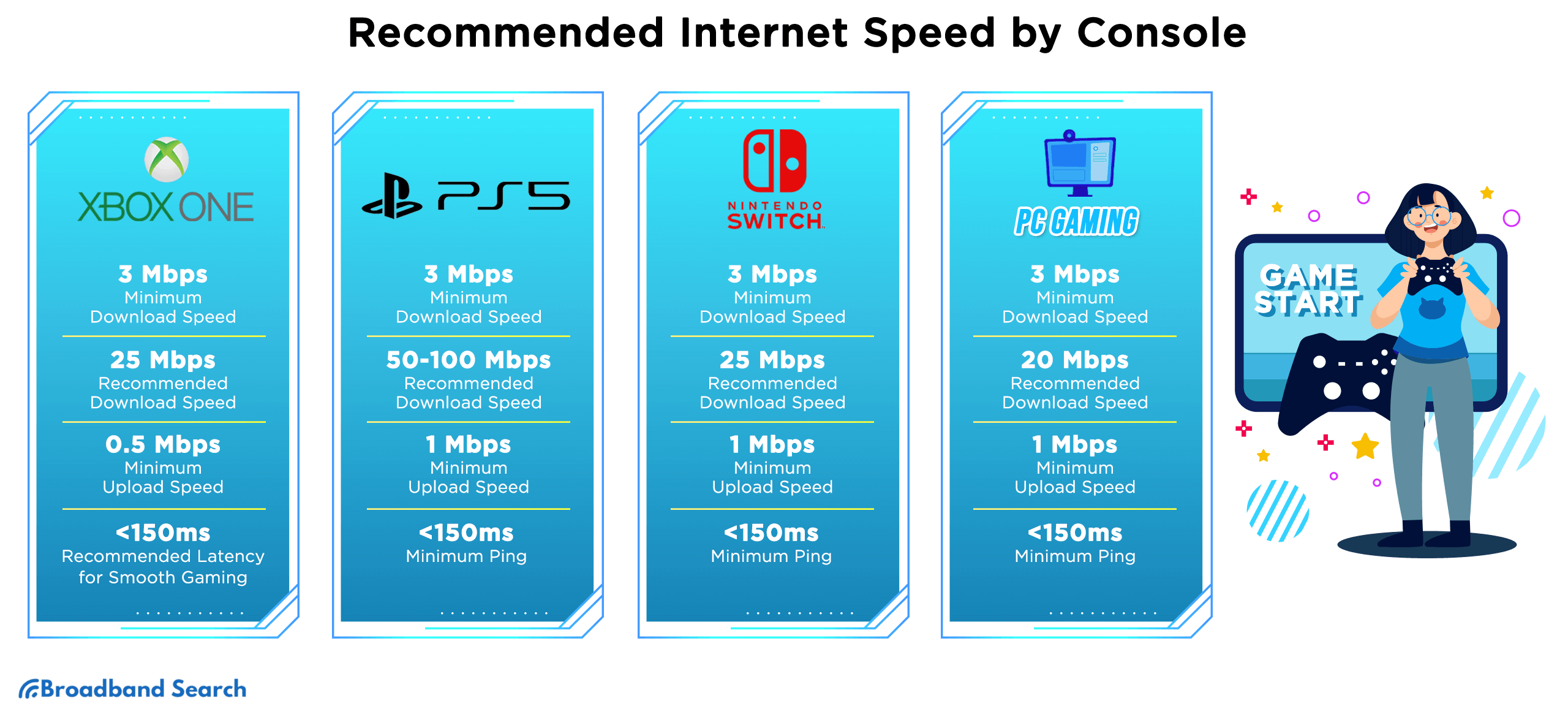

Internet Test For Online Gaming At Maria Couch Blog G1 . Internet Speed For Gaming How Fast Do You Really Need Internet Speed For Gaming 2 375x270 . A Guide To Internet Speeds G5 Recommended Speed . What Is A Good Download Speed For Gaming 2. Minimum Internet Speed For Each Gaming Console . Internet Test For Online Gaming At Maria Couch Blog 2. Recommended Internet Speeds For Different Gaming Platforms
)


Superfast Broadband Speeds Benefits And Everything You Need To Know Filters Quality(75). What Games Use The Most Bandwidth 1 585x469 . What Is A Good Internet Speed For Gaming 2026 Cable TV Info What Is A Good Internet Speed For Gaming . What Speed Internet Do You Need DROIX Blogs Latest Technology And Minisforum X400 WiFi Speedtest 1600x900 . What Is The Minimum Bandwidth For Streaming Video At Michael Lefroy Blog 1. The Minimum Internet Speed You Need
What Internet Speed Do I Need For Gaming And Streaming Techprim Com Internet Speed Required For Gaming . What Is A Good Internet Speed For Gaming Good Internet Speed For Gaming. How Much Memory Bandwidth Do I Need For Gaming At Makayla Sachse Blog Featured . How Much Internet Speed Do I Need In Canada 50 100 500 Mbps Or 1 Gbp How Much Internet Speed Do I Need In Canada.webp. 4K Gaming Speed Guide Internet Speeds You Need For 4k Gaming In Sa.webp

_20260112111606z.jpg)

Does A VPN Help With Internet Speed Fastest VPNs 2026 What Is A Good Internet Speed For Browsing Streaming Gaming 1 800x480 . How To Get The Best Internet Speed For Gaming How To Get The Best Internet Speed For Gaming 1 . Gaming Guide What Internet Speed Do I Need For Gaming OIYRHW Best Internet For Gaming Speed Test Latency Results . What Internet Speed Do I Need For My Business TP Link Philippines Internet Speed (1) . What Is The Best Internet Speed For Gaming YouTube


What Fibre Speed Do I Need For Netflix Gaming And Streaming Streaming Chart . What Internet Speed Do You Need To Stream Games WePC Large What Internet Speed Do You Need To Stream Games 1200x750 . Best Internet For Gaming In 2026 Fast Speeds Top ISPs Best Internet For Gaming 1024x576 . How Do I Get My Internet Speed Faster 2. LIST OF COMMON DAILY INTERNET USES . Wifi Speed Explained How Much Internet Speed Do I Need Valasys Media Wifi Speed Explained How Much Internet Speed Do I Need.webp

)

How Much Does It Take To Be The Top 1 In Each U S State Fastest Internet Speeds 2024 SHARE 1000x600 . Best Internet Speeds For Gaming Speed Net 80e957 . What S A Good Internet Speed For Gaming 2026 Guide Virgin Media O2 Filters Quality(75). What Broadband Speed Do I Need UK Guide What Broadband Speed Do I Need . Top 5 Internet Providers For Gaming In 2026 Best Internet For Gaming


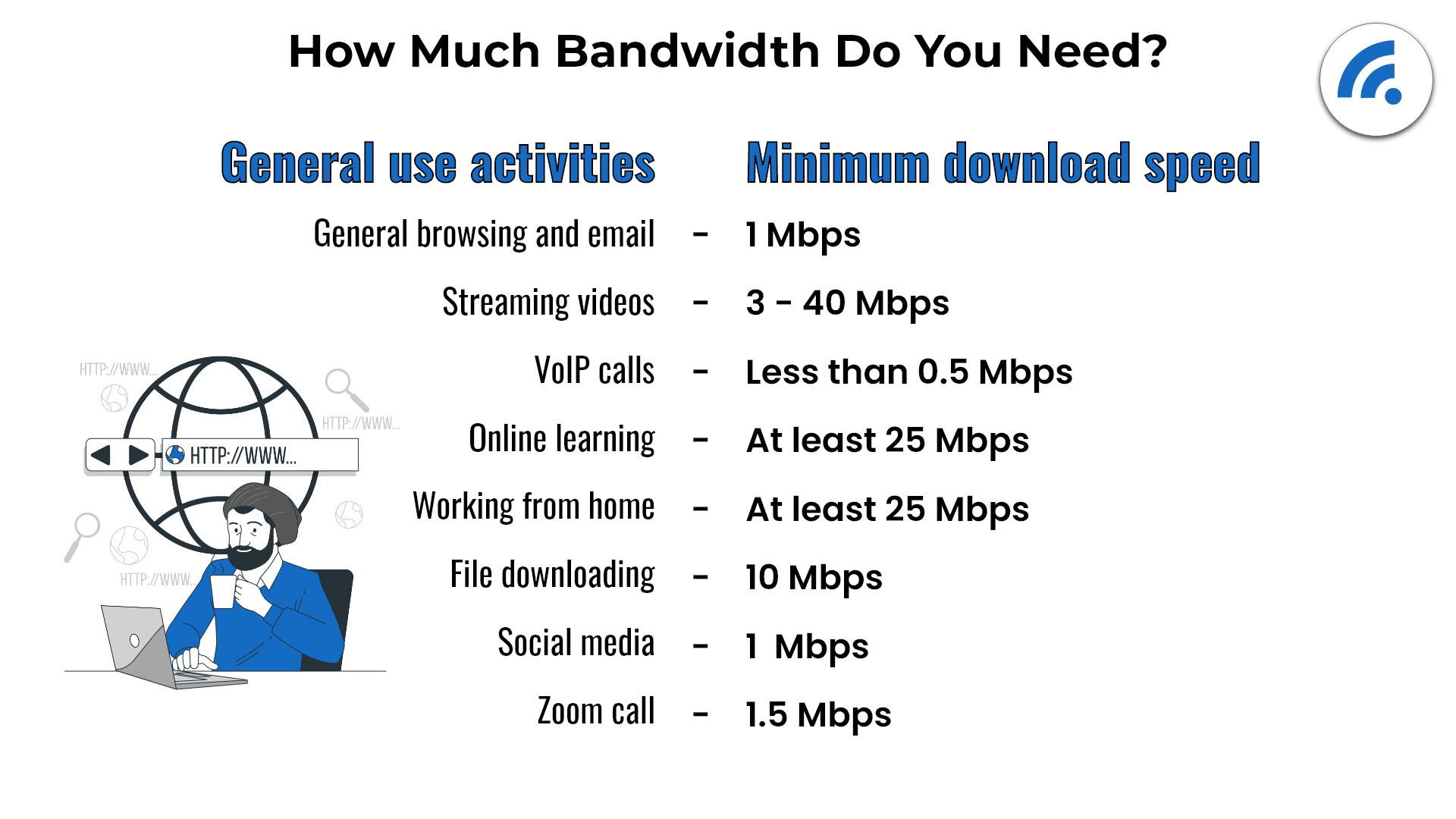
What Is A Good Internet Speed For Gaming RANKS NET What Is A Good Internet Speed For Gaming Featured Image 760x475 . What Internet Speed Do I Need For My Business TP Link Philippines Internet Speed Optimized . Want To Play PC Games What Should You Consider GAMES IN 2026 . How Much Internet Speed Do You Need To Game LIKE A PRO YouTube . How Much Internet Bandwidth Do I Need MGNAR 2. How Much Bandwidth Do You Need